Accounts payable and invoice management
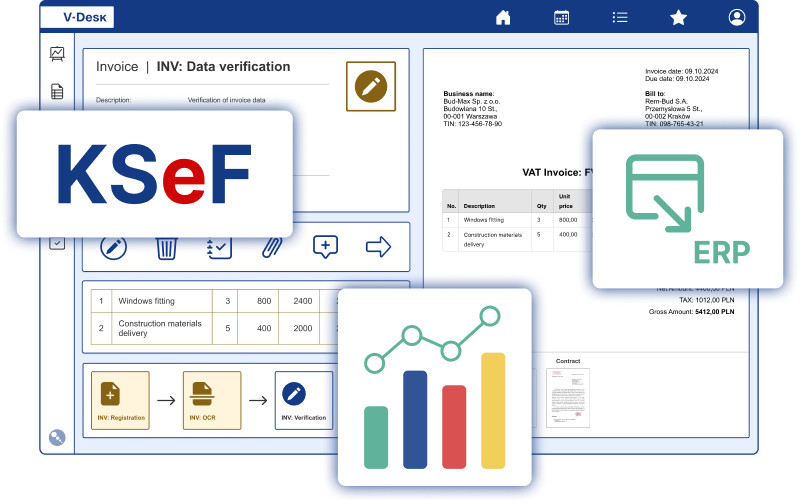
V-Desk is the ideal tool for streamlining your organisation’s invoice and accounts payable processes. In a single system, you can plan your company’s invoice workflow, integration with the National e-Invoice System (KSeF), monitor the payment status of invoices issued and manage fixed assets. You can additionally control and analyse all these processes with the intelligent Power BI tool.
















Modules for invoicing and AP
in V-Desk and V-Desk GA

invoices
Electronic invoice workflow is the process of converting a document from paper to digital and its onward flow within an organisation.

KSeF
The V-Desk is connected to the National e-Invoice System. It sends and receives structured invoices from KSeF.

Power BI
An analytical knowledge base to support strategic decision-making, both for managers and every employee.

Payment files
The Payment Files application enables mass preparation of domestic and international transfer batches, ensuring efficiency, accuracy, and compliance in payment processing.

DORA
V-Desk supports financial sector organizations in meeting the obligations imposed by the DORA regulation, providing tools for ICT risk management, monitoring of external service providers, and DORA-compliant reporting.

Debt collection
Invoice recovery is a process that enables recovery actions to be carried out in the shortest possible time.
Full digitalisation of business processes at your fingertips.
More than 200,000 satisfied V-Desk users have taken advantage of this opportunity.
From invoice to payment
Many organizations implement electronic invoice processing, but only a well-designed “from receipt to payment” process truly eases the accounting workload and clarifies responsibilities. Below, we describe a sample scenario that you can adapt to your organization’s structure (branches, cost centers, projects, multi-level approvals, substitutions).
1. Document registration and data completeness
The invoice enters the system via email, scan, or as a structured document through KSeF integration. From the start, you can define which fields are required (e.g., vendor, tax ID, amount, payment due date, cost center, purchase order number, project). This minimizes documents lacking key information and reduces clarifying correspondence.
2. Substantive verification and purchase compliance
The document is automatically routed to the appropriate people (e.g., budget owner, project manager, or procurement department). The process can support compliance checks with purchase orders and receipts (three-way matching: invoice–order–delivery note/protocol). In practice, this means fewer errors, fewer corrections, and a clear decision trail.
3. Financial approval and risk control
On the accounting side, the process includes formal correctness checks, tax qualification, and assignment to the appropriate accounts and registers. Workflow rules allow adding control stages (e.g., amount thresholds, exceptional paths for leases or fixed assets) and managing substitutes during vacation periods.
4. Payment preparation and status monitoring
Once the document is approved, you can generate payment batches through payment files. This can be done in bulk, with separation by currency and due date. The system simultaneously maintains statuses (to be paid / paid / overdue), facilitating communication with the business and supporting collections for sales invoices.
5. Reporting and analysis in Power BI
Once the process is standardized, data starts working for the company. Reporting in Power BI allows you to analyze approval times, invoices in the queue, bottlenecks, values broken down by cost center/project, or payment timeliness. It’s a quick way to move from “firefighting” to consciously managing cash flow and team workload.
Invoices and accounting in V-Desk are

Saving time
when registering accounting documents.

Secure storage of
information on assets and financial history.

A shortened process
acquisition and processing of organisational data
How does V-Desk streamline invoicing and accounts payable management?

With the V-Desk system, you can come up with any invoice workflow that is perfectly tailored to your organisation’s needs.
Electronic invoice collection allows you to automatically monitor the payment status of your invoices. In the V-Desk system, you can come up with any invoice workflow that is perfectly tailored to your organisation’s needs.
The electronic fixed asset register makes it easy and transparent to keep a record of the equipment owned by the company.

Our Clients about V-Desk
Bostik
“We took advantage of the consulting and analytical support provided by Primesoft Polska, and as a result of our cooperation, the V-Desk electronic document circulation system was launched in our organization. We confirm the implementation of the solution in the areas of contracts, orders, and invoices, as well as its integration with the Exact financial system. In all areas, document approval and circulation processes have been streamlined, and control at every stage has been strengthened.”

Elplast +
The expectations we had for digitizing our company have been met. With the V-Desk system, we are no longer using paper documents, which has had a positive impact on the efficiency of our processes.
 Renata Rosenbeiger, Chief Accountant at Elplast+ sp. z o.o.

Lhoist Bukowa
“The workflow system from Pimesoft is a simple way to collect quality information, analyse trends, identify problems, and take corrective action. This allows for continuous process improvement and higher quality standards.”

Jass Board
“The switch to digital task and document workflows was our goal, which we were able to achieve with the professional support of Primesoft.”
 Mariusz Lisiecki, Information Systems Manager

Mitutoyo Polska
V-Desk allows us to focus on the tasks that are essential to our business, without wasting valuable time waiting for documents or registering them manually.
BMW Dynamic Motors
“Cooperation with Primesoft Polska began in 2021 and focused on the introduction of solutions aimed at the complex digitization of business processes management.”

Autostrada Wielkopolska
“We implemented this system as an independent platform available to our subcontractors, self- employed engineers, and other external entities. We wanted to streamline document circulation in our company. We searched the market for programmes that would be easy to use, ergonomic, but also flexible in terms of future system development.”
Securitas
“During 11 years of using V-Desk, we have become convinced of the flexibility of this solution, which is why we commissioned modifications allowing V-Desk to be integrated with another system in the company. We confirm that the work was carried out to the highest standard, maintaining high standards of business ethics and continuity of processes in the company.”

Kia Polska
“With a professional approach and a deep understanding of our needs, the solution meets our expectations. V-Desk is easy to use and functional, but above all, it streamlines the work of many people and increases the efficiency of the company’s operations.”
NUXE
“V-Desk GA introduced a systematic approach to processes at Nuxe, reducing the problems associated with manual document handling. From now on, we manage invoices electronically and handle HR processes such as vacation requests and approvals, as well as employee attendance records.”

SMP Poland
The system allows us to easily track payment deadlines, verify incorrect entries and, above all, eliminate manual work at many stages of invoice processing.
Rotometal
“We chose the V-Desk solution because of its wide range of options for adapting the solution to our individual processes, as well as the flexibility it offers when integrating with the SAP system.”
JMP Flowers
“We no longer waste time searching for invoices, and we have resolved situations where tasks were not monitored and responsibility was unclear. With the V-Desk System, we have achieved smooth document processing.”

Ariadna SA Fabryka Nici
“The transition to a digital document circulation system involved changes that had a positive impact on the functioning and flow of processes such as invoice circulation, requisitions, purchases and employee requests. The workflow system was launched to handle the circulation of cost invoices, of which approximately 500 are processed each month.
The positive cooperation with Primesoft, whose goal was to digitise Ariadna, allows us to plan the expansion of the V-Desk system with additional modules.”
 Beata Karbowniczak, Chairman of the Board

Polipak
The flexibility of the implemented system means that its development possibilities, tailored to the company’s current needs, are an additional advantage that is highly valued by our company.
Domost
We value the potential of the V-Desktop platform, its stability and functionality, which allows us to save time and resources. Tasks including document registration and approval have been automated, and we now have effective control over the process.
Grupa Pracuj
“V-Desk is a modern and efficient solution, equipped with a range of tools that significantly improve the comfort of everyday work. We appreciate the flexibility and scalability of the system, which allows documents to be processed efficiently and in accordance with established procedures. By launching the V-Desk system, we have significantly reduced the use of paper documents, and the processing and management of invoices and correspondence in the company has been optimized.”

EFL Leasing
“Given that we have been successfully cooperating with Primesoft Polska Sp. z o.o. for many years in the development of the V-Desk system, we are pleased to recommend it as a supplier of electronic document circulation systems.”