Company Resource in V-Desk
Smart resource management made simple.
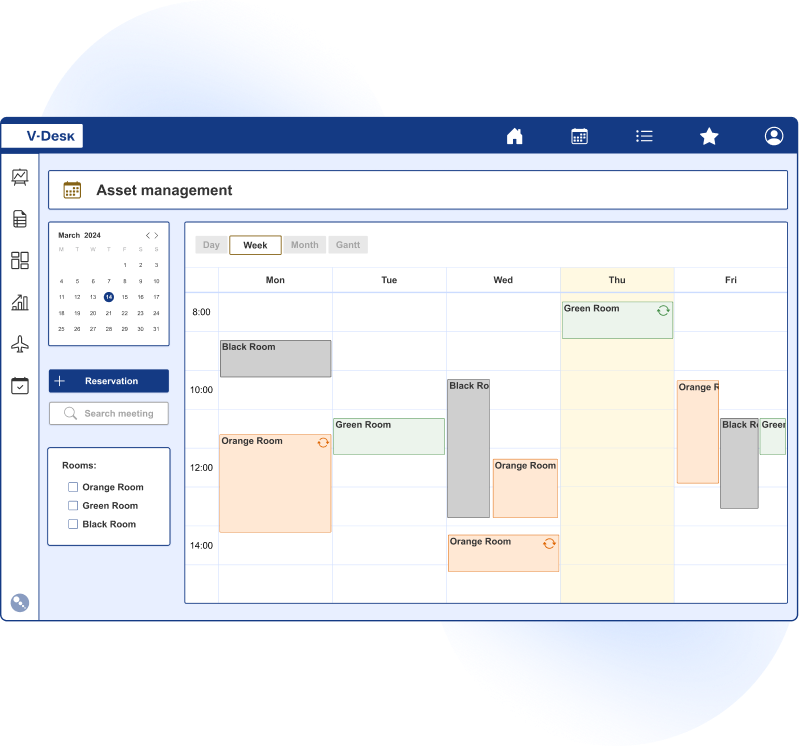
V-Desk Resources Reservations app is designed to manage all company resources in a flexible way.
With V-Desk, you can easily plan and book:
- conference rooms for team meetings,
- company vehicles,
- shared resources such as office equipement
- others.
With an intuitive app, you can manage time and organise work with available resources — all with a single click.

Challenges employees face while managing company resources
Time consuming and tedious form filling, no centralized request system
Different channels of reservation request such as e-mails, phones, paper documents make difficult to manage the resources available.
Data and info about reservations manually introduced in the tables and sheets lead to chaos.
Time consuming and tedious search for information about the actual availability of the assets.
No automation in the process
No updates of the information about the resource availability.
Inefficient usage of the assets.
Chaos of information.
No real-time information
Lack of the calendar view of all available resources.
No reminders in the form of alerts and notifications.
Non-flexible mechanisms of acceptance and rights approval.
Resource reservation in V-Desk – key features
Effortlessly plan and manage facilities, resources, equipment with the advanced capabilities of V-Desk.

Planner
Real-time visibility of assets allocations.

Recurring reservations
Scheduling recurring reservations, e.g., weekly meetings.

Alerts
Automatic conflict detection in reservations.

Notifications and invitations
System and email reminders about upcoming meetings.

Fast, intuitive search for what you need in seconds.
Easy finding of rooms, vehicles, or equipment thanks to the built-in search engine.

Access management
Ability to grant permissions and approvals by supervisors.
Applications of the V-Desk Resource reservations in your company
Remote access and full control
Electronic booking of resources for employees is convenient and simplifies work. The online application allows reservations from anywhere at any time.
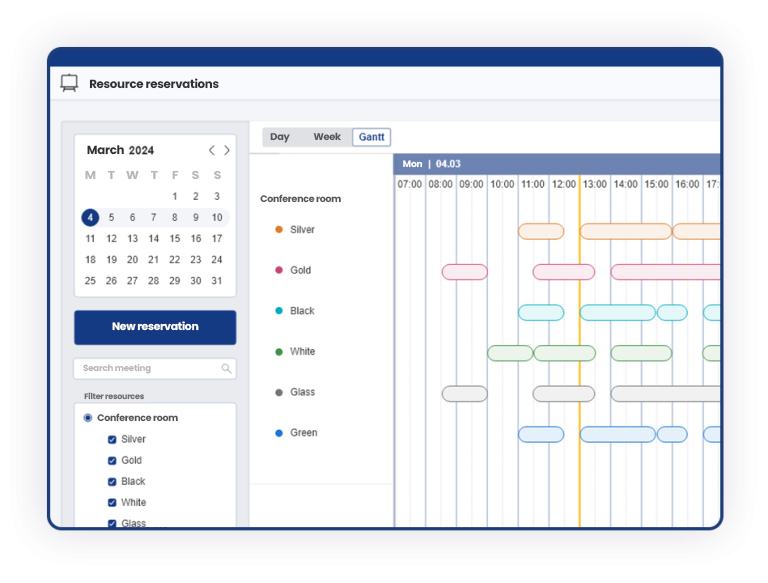
A centralized management calendar provides a quick overview of resource availability and usage. With a single click, you can book rooms once or on a recurring basis—without leaving your desk or wasting time sending emails or making calls.
Access management and manager approvals
Efficiency improves when reservations are handled in one dedicated application. Employees can be assigned access rights for specific resource types, and bookings can be made conditional on manager approval. A manager’s confirmation within the system authorizes use of the resource. Notifications are sent both via email and within the system.
Invite the whole team with one click
Booking a resource is simple. Open the calendar view to check conference room availability, select the date and time, and choose participants. The system automatically sends an email with meeting details, including location, time, and organizer.
Make managing resources easier!
Streamline process and save valuable time. V-Desk brings everything you need together in one convenient platform.
Choose Resource Reservation app and enjoy:

Time savings
Speed up bookings and cut the red tape.

Transparency
A single hub for managing all your resources effortlessly.

Automation
Minimize errors and eliminate manual tasks.

Efficiency
Maximize the efficiency of your company’s resources.

Access
Book resources anytime, anywhere, from any device.

Asset tracking
streamlined asset maintenance with due date tracking and email reminders.
Step-by-Step booking process
Booking resources in V-Desk is intuitive and does not require additional email coordination. Open the reservation calendar and check availability in real time. Then select a resource (e.g., room, company car, desk, or equipment) and choose the date. For recurring meetings, set repetition, and your schedule is covered for upcoming weeks.
The system prevents errors. Alerts notify you of conflicts and overlapping bookings, saving time from manual verification. Once saved, invitations are sent to participants via email and in-system notifications. Each participant sees the time, location, and organizer in one place.
In organizations where reservations require oversight, approval workflows are available. Employees submit requests, and responsible managers approve them according to company rules. Everything is documented, keeping communication consistent and transparent.
Reservation data helps plan resources
Every reservation provides concrete information on how company resources are actually used. Over time, you gain insights: which rooms are booked most often, peak usage hours, and where downtime occurs. This helps make operational decisions without guesswork or relying on scattered spreadsheets.
Calendar data also improves team planning. You can better schedule vehicle availability, identify critical resources (e.g., specialized equipment), and optimize utilization. If recurring availability issues arise, you can justify rule changes (e.g., priorities, limits) or expand the resource pool.
The result is less chaos, fewer misunderstandings, and more predictability. Teams find available resources faster, and administration gains greater control over current and future resource planning.
Hybrid work and shared resource reservations
In hybrid work models, visibility is key. When employees rotate in-office, desk and parking space reservations become essential. V-Desk organizes all shared resources in one place, showing who is using them and when.
The same applies to mobile and equipment resources. Company cars, projectors, video conferencing kits, or specialized tools no longer need to be booked via phone or paper. Employees check availability, reserve, and, if required, trigger an approval workflow. Resources are never unnecessarily blocked, and responsible parties maintain oversight.
The effect is simple: fewer delays, fewer conflicts, and more time for productive work. Reservations become a fast, natural process, just like scheduling meetings in a calendar.
Our Clients about V-Desk
Securitas
“During 11 years of using V-Desk, we have become convinced of the flexibility of this solution, which is why we commissioned modifications allowing V-Desk to be integrated with another system in the company. We confirm that the work was carried out to the highest standard, maintaining high standards of business ethics and continuity of processes in the company.”
EFL Leasing
“Given that we have been successfully cooperating with Primesoft Polska Sp. z o.o. for many years in the development of the V-Desk system, we are pleased to recommend it as a supplier of electronic document circulation systems.”

Jass Board
“The switch to digital task and document workflows was our goal, which we were able to achieve with the professional support of Primesoft.”
 Mariusz Lisiecki, Information Systems Manager
Mitutoyo Polska
V-Desk allows us to focus on the tasks that are essential to our business, without wasting valuable time waiting for documents or registering them manually.
Elplast +
The expectations we had for digitizing our company have been met. With the V-Desk system, we are no longer using paper documents, which has had a positive impact on the efficiency of our processes.
 Renata Rosenbeiger, Chief Accountant at Elplast+ sp. z o.o.

BMW Dynamic Motors
“Cooperation with Primesoft Polska began in 2021 and focused on the introduction of solutions aimed at the complex digitization of business processes management.”

JMP Flowers
“We no longer waste time searching for invoices, and we have resolved situations where tasks were not monitored and responsibility was unclear. With the V-Desk System, we have achieved smooth document processing.”
Rotometal
“We chose the V-Desk solution because of its wide range of options for adapting the solution to our individual processes, as well as the flexibility it offers when integrating with the SAP system.”
Kia Polska
“With a professional approach and a deep understanding of our needs, the solution meets our expectations. V-Desk is easy to use and functional, but above all, it streamlines the work of many people and increases the efficiency of the company’s operations.”
SMP Poland
The system allows us to easily track payment deadlines, verify incorrect entries and, above all, eliminate manual work at many stages of invoice processing.
Ariadna SA Fabryka Nici
“The transition to a digital document circulation system involved changes that had a positive impact on the functioning and flow of processes such as invoice circulation, requisitions, purchases and employee requests. The workflow system was launched to handle the circulation of cost invoices, of which approximately 500 are processed each month.
The positive cooperation with Primesoft, whose goal was to digitise Ariadna, allows us to plan the expansion of the V-Desk system with additional modules.”
 Beata Karbowniczak, Chairman of the Board

Domost
We value the potential of the V-Desktop platform, its stability and functionality, which allows us to save time and resources. Tasks including document registration and approval have been automated, and we now have effective control over the process.
Bostik
“We took advantage of the consulting and analytical support provided by Primesoft Polska, and as a result of our cooperation, the V-Desk electronic document circulation system was launched in our organization. We confirm the implementation of the solution in the areas of contracts, orders, and invoices, as well as its integration with the Exact financial system. In all areas, document approval and circulation processes have been streamlined, and control at every stage has been strengthened.”

Polipak
The flexibility of the implemented system means that its development possibilities, tailored to the company’s current needs, are an additional advantage that is highly valued by our company.
NUXE
“V-Desk GA introduced a systematic approach to processes at Nuxe, reducing the problems associated with manual document handling. From now on, we manage invoices electronically and handle HR processes such as vacation requests and approvals, as well as employee attendance records.”

Lhoist Bukowa
“The workflow system from Pimesoft is a simple way to collect quality information, analyse trends, identify problems, and take corrective action. This allows for continuous process improvement and higher quality standards.”
Grupa Pracuj
“V-Desk is a modern and efficient solution, equipped with a range of tools that significantly improve the comfort of everyday work. We appreciate the flexibility and scalability of the system, which allows documents to be processed efficiently and in accordance with established procedures. By launching the V-Desk system, we have significantly reduced the use of paper documents, and the processing and management of invoices and correspondence in the company has been optimized.”
Autostrada Wielkopolska
“We implemented this system as an independent platform available to our subcontractors, self- employed engineers, and other external entities. We wanted to streamline document circulation in our company. We searched the market for programmes that would be easy to use, ergonomic, but also flexible in terms of future system development.”