
An office register helps organize letters and documents, especially when there is an excessive number of them. Thanks to it, document workflow can be managed much more effectively and information about a specific case can be easily retrieved. How should an office register be maintained and which system should you choose?
This article will explain the following:
Office register – what is it?
It is a collective list of all uniform documents or cases handled within a selected organizational unit. It may exist in the form of a paper ledger, a file of forms with a defined structure, or in an electronic format.
Registers are intended to replace traditional lists of uniform cases when their number becomes too large. This allows for better organization and easier retrieval of documents related to a specific case.
An office register is usually maintained by one designated person. It is created at the request of the head of an organizational unit or a department responsible for handling specific types of cases.
The document is structured either by subject matter or alphabetically. Entries are made in dedicated forms or in a computer system and marked with a unique symbol, which is also assigned to the file containing completed cases.
Depending on the number of cases of the same type being handled, registers may be maintained over different periods, e.g. annually or over several years.
Want to learn more about running a digital office and managing correspondence workflow?
Types of office registers
There are several types of office registers, depending on the issues handled by a given office. The most common include:
- Registers of resolutions, ordinances, and official documents.
- Registers of complaints and applications.
- Correspondence registers.
- Case registers.
- Registers of authorizations and permits.
- Registers of internal acts.
Some materials from external sources are not registered, such as publications and magazines, accounting documents, delivery confirmations, or greeting cards.
Electronic Delivery – what is it and since when has it been in force?
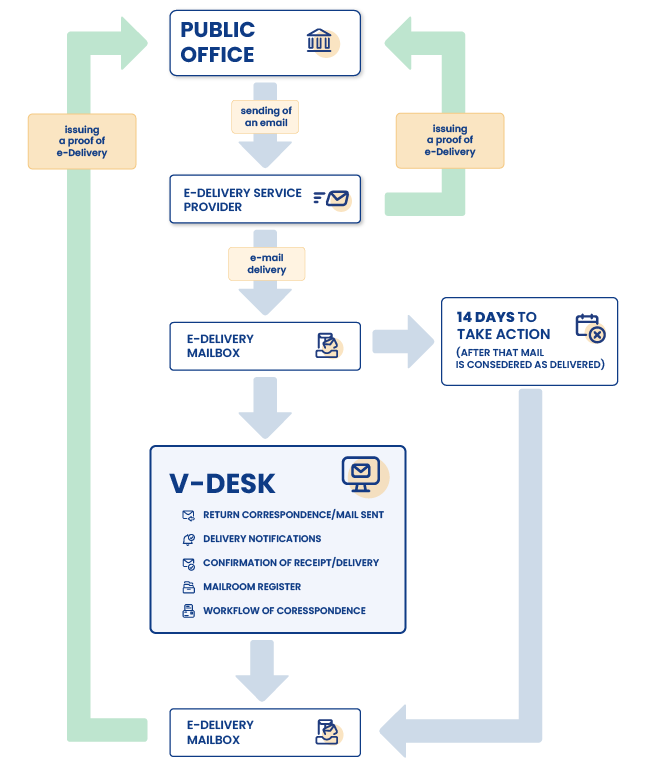
The e-Delivery system is used to send registered correspondence, meaning mail for which proof of posting and receipt is issued. Electronic delivery replaces traditional registered mail with its digital equivalent and can successfully be used for communication with public offices.
e-Deliveries create a so-called virtual inbox and, in accordance with the Act on Electronic Deliveries, documents sent through this system have the same legal effect as registered letters with acknowledgment of receipt.
Ultimately, the electronic delivery system is intended to cover all public administration bodies, but the implementation process will last at least until 2029.
IMPORTANT!
From December 10, 2023, companies and regulated professions (public trust professions) are required to have an electronic delivery address. Sole proprietors registered in CEIDG will be required to create an address for electronic delivery by October 1, 2026.
Office register and e-Deliveries – how does it work?
The purpose of electronic delivery is to improve communication between entities and public administration through the use of a digital environment. However, for this solution to be fully effective, it is necessary to properly integrate the e-Delivery system with the document workflow operating within the company.
The V-Desk Primesoft system, together with the dedicated e-Delivery application, enables automatic feeding of the office register without the need to manually record letters in ledgers.
Need more information about integrating the V-Desk system with the official e-Delivery system?
The e-Delivery tool in the V-Desk platform enables:

Periodic querying of the e-Delivery service to retrieve new correspondence.

Downloading a unique proof of delivery with a qualified timestamp.

Downloading a unique posting confirmation identifier.

Automatic verification of the correctness of the correspondence address in the Electronic Address Database.

Access to correspondence status.

Registration of attachments as related documents.

Talk to an expert
Are you interested in this topic and would like to learn how to improve correspondence management in your company?
Contact our expert.