
V-Desk integrations
Break down silos. Connect your apps. Streamline your business
V-Desk fits right into complex IT environments, offering seamless integration with a wide range of enterprise systems and industry-specific applications.
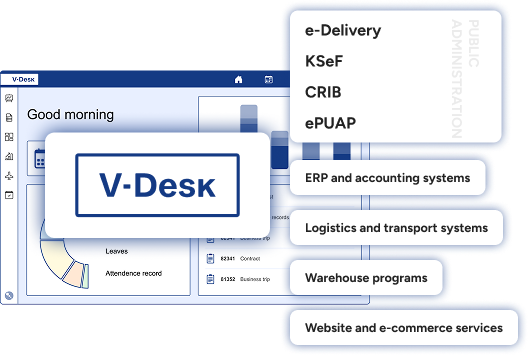
Whether you’re running ERP platforms, accounting software, or tools for communicating with public administration—V-Desk connects the dots and keeps your ecosystem in sync.
When an organization relies on multiple systems and applications, smooth and efficient data exchange is key.
Integrating databases helps eliminate chaos, downtime, and duplicated effort.
That’s where V-Desk comes in—automating processes, boosting operational efficiency, and breaking down information silos before they slow you down.











V-Desk Integrates with the Systems You Already Rely On

ERP and Finance & Accounting Solutions
SAP, Microsoft Dynamics, Oracle, BaaN, Exact, IFS, Comarch ERP, Comarch ERP Optima, Symfonia, Enova365, Graffiti
Public Sector and Government Communication Systems
e-invoicing (KSeF,) e-Delivery, ePUAP (Electronic Platform of Public Administration Services), CEiDG (Central Registration and Information on Business)
government platforms
(m.in. rejestr GUS, biała lista, BIK, KRD)
e-sign tools
including cloud-based electronic signatures (also known as mobile signatures)
Microsoft Power BI
Eurotax
base a trusted provider of data for the automotive sector
Sync V-Desk with the current digital ecosystem — and take your digital transformation to the next level
How V-Desk Connects with Your Systems

REST API
JSON structure
tunel VPN
Microsoft Azure
Example V-Desk integrations
Integrations in the V-Desk system begin with actions that relieve the team as quickly as possible. A document can be automatically created in V-Desk based on data from an ERP or financial-accounting system, assigned to the appropriate process, and immediately sent for approval. Once the workflow is completed, the status, document number, accounting entries, or other key data are returned to the source system without manual rewriting or duplication of work.
In a similar way, contractor records, cost dictionaries, MPK cost centers, or project data can be synchronized so users always work with up-to-date information. Integrations also include communication with public administration (e.g., KSeF, e-Delivery). V-Desk can retrieve confirmations, attachments, and metadata and automatically link them to the appropriate case or document.
Seamless integration with your IT ecosystem
With open architecture and flexible APIs, V-Desk connects effortlessly even to non-standard systems—regardless of your industry or company size.
Our project team will ensure a smooth integration and your business processes run smarter, faster, and more efficiently.

API Generator
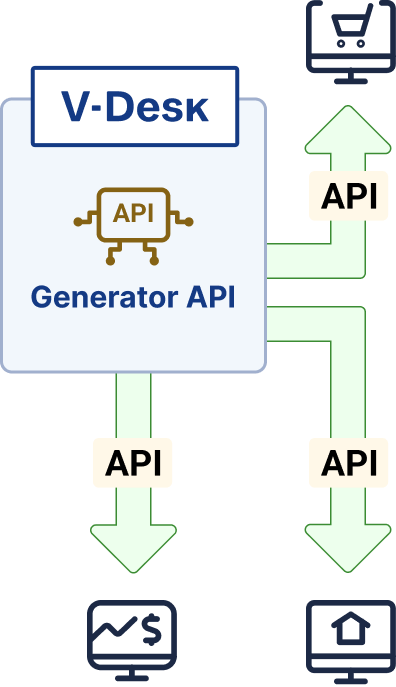
V-Desk comes with an API Generator module that enables the creation of API endpoints in a no-code model, without the need for developer input. This approach allows smooth integration in just a few clicks—fast, simple, and free of charge on the V-Desk side—enabling data exchange between V-Desk and external systems.
Security and Data Flow Control
Integration should work quickly, but above all predictably. That is why, in integration projects, we ensure clear rules for data exchange regarding scope, direction of flow, permissions, and event logging. Communication can take place via REST API using JSON, and depending on requirements, also through a VPN tunnel or within a Microsoft Azure environment. This makes it easy to adapt the connection model to IT standards and security policies within the organization.
It is also important to handle exceptions such as validations, queuing, retries, and clear error reporting. The API Generator in V-Desk facilitates the ongoing development of integrations when processes or data structures change. Thanks to this tool, updates can be introduced quickly without involving a V-Desk developer.